






Pursuing a career in UI/UX design offers a blend of creativity, problem-solving, and technical skills. UI (User Interface) design focuses on the aesthetics and interactive elements of digital products, while UX (User Experience) design emphasizes the user’s journey and overall satisfaction with the product. These roles often intertwine, with designers working to create visually appealing and easy-to-navigate experiences that engage users. Becoming a UI/UX designer requires both an eye for design and a passion for understanding user behavior.
Aspiring designers typically start with foundational skills in design principles, color theory, typography, and user-centered design to embark on this career path. Understanding basic design software such as Adobe XD, Sketch, and Figma is essential, as these tools are widely used in the industry. Learning about wireframing, prototyping, and user research methods also helps build a solid foundation for creating effective designs that enhance the user experience.
Building a portfolio is key to demonstrating your skills and creativity to potential employers or clients. Showcasing personal projects, freelance work, or redesigns of existing products can give you an edge in a competitive job market. As you gain experience, consider learning about design systems, accessibility standards, and design psychology. With continuous practice, curiosity, and the drive to keep learning, a fulfilling career as a UI/UX designer can be within reach.
UI (User Interface) Design focuses on the visual and interactive elements of a digital product, shaping how a user interacts with the app or website. This includes the design of buttons, icons, layouts, color schemes, typography, and overall aesthetic appeal. UI designers ensure that each visual element is engaging, consistent, and aligned with the brand's identity.
Their role is to create a cohesive look and feel that enhances user interaction and guides them intuitively through the interface. In addition to the visual layout, UI design considers interactivity and responsiveness across different devices and screen sizes.
UI designers work with tools like Adobe XD, Figma, and Sketch to build polished, accessible interfaces. They collaborate with UX designers, developers, and product teams to refine the look and usability of each element. Ultimately, UI design is about crafting interfaces that not only look good but also provide an effortless experience for the user.
UX (User Experience) Design focuses on the overall experience and journey a user has when interacting with a digital product. This includes researching user needs, mapping out user flows, and designing processes that make the product intuitive and enjoyable to use. UX designers are responsible for ensuring that every aspect of a product’s design aligns with the users' expectations, solving problems that enhance usability and engagement.
They consider how users feel when navigating through the app or site and aim to make the experience smooth and satisfying. The UX design process involves gathering user insights through surveys, testing, and interviews, which guide design decisions. UX designers create wireframes, prototypes, and user journeys to visualize how users will interact with the product.
Their goal is to make the product valuable, accessible, and easy to navigate, regardless of the user's familiarity with technology. A successful UX design improves user satisfaction, retention, and loyalty by offering a seamless, effective experience.
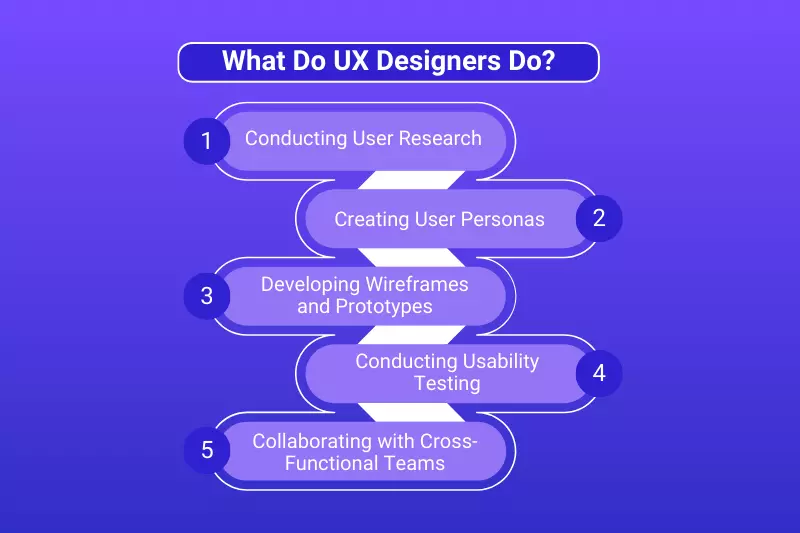
UX designers play a crucial role in creating products that are both functional and delightful for users. Their work revolves around understanding user needs, behaviors, and motivations to develop intuitive, user-friendly experiences.
They dive deep into research, design, and testing processes to ensure the final product meets user expectations and aligns with business goals. By focusing on how users interact with an app, website, or software, UX designers aim to solve usability issues and enhance overall satisfaction.
Becoming a UI/UX designer is an exciting journey that combines creativity, empathy, and technical skills to create meaningful digital experiences. It requires a blend of design expertise and an understanding of user behavior to develop interfaces that are both visually appealing and user-friendly.
Starting as a UI/UX designer involves building foundational skills in design principles, user research, and prototyping tools. Whether you’re switching careers or starting fresh, a step-by-step approach can help you build a solid skill set and a competitive portfolio.
The foundation of UI design lies in understanding visual design principles, including color theory, typography, balance, and alignment. By learning these fundamentals, you can create cohesive, appealing designs that attract users. Familiarize yourself with concepts like contrast, hierarchy, and visual flow to ensure your designs guide users intuitively.
Practice by creating mockups, experimenting with color schemes, and studying the layouts of popular digital products to understand how successful designs balance aesthetics and usability. Mastering these principles enables you to craft designs that not only look great but also function effectively, meeting the needs of diverse audiences.
Familiarity with key design tools is essential for UI/UX designers, as these tools facilitate the creation of wireframes, prototypes, and final designs. Start with industry-standard programs like Figma, Sketch, and Adobe XD. Each tool has unique strengths, such as Figma's collaboration features and Sketch's vector editing capabilities.
Spend time experimenting with these tools, following tutorials, and creating sample projects. Gaining technical fluency with these tools will allow you to bring creative ideas to life and enhance collaboration with other team members, making you a more efficient and valuable designer.
User research and testing are integral to understanding what users need and how they interact with your product. Learning techniques like surveys, interviews, and usability testing enable you to gather insights into user preferences and pain points. Use these findings to make evidence-based design decisions, improving the product’s usability.
Testing with real users also helps identify potential issues early on, allowing for continuous improvement. Becoming proficient in research and testing allows you to create user-centered designs that respond effectively to real-world needs and improve satisfaction, making your designs more impactful and purposeful.
Information architecture (IA) and user flows determine how content is structured and how users navigate through a product. IA focuses on organizing information so users can find what they need quickly while user flows map out each step users take to complete tasks. By mastering these skills, you can design intuitive navigation paths that improve the user experience.
Practice creating flowcharts, sitemaps, and navigation structures, paying attention to usability principles that make digital journeys smooth and logical. These skills help you structure information in a way that reduces user effort, enhancing overall satisfaction with your design.
A portfolio is a critical tool for showcasing your skills and design approach. Include a range of projects that demonstrate your ability to solve diverse design challenges, from mobile apps to website redesigns. Document each project’s process, highlighting your research, design iterations, and outcomes. Use platforms like Behance or Dribble, or create a personal website to display your work.
A strong portfolio provides potential employers or clients with insight into your capabilities and can set you apart in the competitive UI/UX field. A well-organized portfolio can effectively convey your problem-solving skills, creativity, and design thinking process.
Interaction design is the practice of making the user's experience with a product engaging and enjoyable. Microinteractions, like button animations or feedback indicators, enhance interactivity and create memorable experiences. Study interaction principles to understand how animations, hover effects, and transitions can enhance usability and engagement.
Practice incorporating microinteractions into your projects to add personality and functionality. Mastering interaction design will give your designs a polished, user-friendly feel that can significantly elevate the user experience, making the product more appealing and engaging to users.
Building connections in the UI/UX design community can provide valuable insights, feedback, and career opportunities. Look for mentors who can offer guidance, industry knowledge, and constructive criticism of your work. Attend local or online design meetups, join communities on LinkedIn or Slack, and participate in design challenges.
Networking helps you stay updated on industry trends, get advice from experienced professionals, and discover job opportunities. A strong network can support your growth and inspire new directions in your career, connecting you with mentors who help refine your skills and advance your knowledge.
The field of UI/UX design evolves rapidly, with new tools, methodologies, and trends continually emerging. Keeping up-to-date with the latest advancements, such as voice user interfaces, augmented reality (AR), and AI-driven design, can give you an edge. Read industry blogs, participate in webinars, and try experimenting with new technologies.
Staying informed enables you to adapt your skills, incorporate cutting-edge practices into your designs, and remain competitive as the industry shifts, ultimately enhancing your career potential in UI/UX design. This constant adaptation to trends ensures that your skills stay relevant and forward-thinking.
UI/UX design is a field that requires a commitment to lifelong learning. Develop a habit of exploring new resources, taking online courses, and challenging yourself with design exercises. Reflecting on your past projects and actively seeking feedback helps you refine your skills. Continuous learning keeps you engaged, motivated, and adaptable to changing trends and technologies.
By embracing self-improvement, you’ll grow as a designer and remain equipped to tackle future challenges in the evolving field of UI/UX design. Staying curious and open to new ideas will keep your approach fresh and your designs innovative.
Accessibility and inclusive design are critical components of modern UI/UX design, ensuring that digital products are usable by people with diverse abilities. Learn about accessibility guidelines, such as WCAG (Web Content Accessibility Guidelines), and how to design for users with visual, auditory, or mobility impairments.
Incorporate features like screen reader compatibility, color contrast, and keyboard navigation. By creating inclusive designs, you broaden your product's reach and demonstrate a commitment to ethical design, making products usable and enjoyable for everyone. Embracing accessibility enhances your designs' usability, inclusivity, and positive social impact.
A UX designer needs a diverse skill set that blends creativity, empathy, and technical knowledge to create user-centered designs. As digital experiences become integral to everyday life, UX designers must deeply understand user behavior, research methods, and design principles to meet user needs effectively.
Additionally, a solid grasp of communication, problem-solving, and adaptability is essential for handling complex design challenges. Each skill not only helps designers create meaningful and functional products but also enhances collaboration with cross-functional teams. Here’s a look at the critical skills required to succeed as a UX designer.
User research is the backbone of UX design, enabling designers to understand their audience's behaviors, needs, and pain points. This skill involves conducting interviews, surveys, and usability testing to gather data on user preferences. By analyzing these findings, UX designers can create user personas and identify patterns that inform design decisions.
Developing a strong foundation in research methods helps designers approach projects with an evidence-based mindset, ensuring that each design element serves the user's needs and aligns with business goals.
Information architecture is the practice of organizing and structuring content to ensure users can navigate a product effortlessly. IA requires an understanding of hierarchy, labeling, and navigation flows, which help users locate information quickly and logically.
By mastering IA, UX designers can create sitemaps, wireframes, and prototypes that map out the user journey. Good IA reduces user frustration, providing a seamless navigation experience that enhances usability and helps users accomplish tasks efficiently within a digital interface.
Prototyping and wireframing are essential skills that allow UX designers to create a blueprint of the product before development begins. Wireframes offer a basic structure of the interface, outlining the placement of elements, while prototypes simulate the user experience with interactive elements.
Tools like Figma, Sketch, and Adobe XD enable designers to build realistic prototypes that stakeholders can test and review. Prototyping helps UX designers iterate on designs based on feedback, allowing them to refine the experience and troubleshoot potential usability issues early in the design process.
A solid grasp of visual design principles is essential for creating interfaces that are not only functional but also aesthetically pleasing. UX designers must understand typography, color theory, alignment, and spacing to create a harmonious and engaging interface.
Good visual communication guides users’ attention, enhances readability, and establishes a cohesive brand presence. By mastering these principles, UX designers can create visually appealing designs that resonate with users, encouraging positive interactions and reducing cognitive load during navigation.
Empathy is the foundation of effective UX design, allowing designers to put themselves in users' shoes to understand their emotions, motivations, and frustrations. A user-centered mindset helps designers make informed decisions that prioritize user needs and address their pain points.
By empathizing with users, UX designers can create solutions that are inclusive, accessible, and relevant. This skill drives the creation of products that are not only functional but also resonate emotionally with users, providing a meaningful and positive user experience.
Usability testing is a crucial skill that helps UX designers validate their designs by observing how users interact with the product. Through testing, designers can identify areas where users struggle and gather feedback to refine their designs. Usability testing involves techniques such as A/B testing, remote testing, and feedback sessions to evaluate effectiveness.
Regular iteration based on test results allows designers to improve user satisfaction and optimize the product experience continuously. This iterative approach ensures that the final product meets user expectations and adapts to their needs.
UX design is a collaborative field that involves working with cross-functional teams, including developers, product managers, and stakeholders. Effective communication is essential to explain design choices, present research findings, and gather feedback. Collaboration skills help UX designers integrate ideas from various departments, leading to a more cohesive and well-rounded product.
Strong communication fosters alignment between teams, enabling UX designers to work efficiently and advocate for the user’s needs within the organization, ultimately driving a more user-centric approach to product development.
The design process often presents unexpected challenges, requiring UX designers to be adaptable and approach problems with a solution-oriented mindset. Adaptability helps designers adjust to shifting project goals, technological advancements, or user feedback.
Problem-solving skills are essential for finding creative solutions to complex issues, whether optimizing usability or balancing user needs with technical limitations. UX designers who embrace adaptability can navigate changing environments successfully, ensuring that the final design meets both user needs and business requirements.
Accessibility is a critical aspect of UX design, ensuring that digital products are usable for individuals with disabilities. UX designers need to understand Web Content Accessibility Guidelines (WCAG) to create inclusive designs that meet legal standards and enhance usability. This involves implementing features like screen reader compatibility, color contrast, and keyboard navigation.
By prioritizing accessibility, UX designers broaden the product’s reach, creating a user experience that is inclusive and supportive of diverse needs. This commitment not only improves user satisfaction but also reflects ethical design principles.
While not mandatory, having a foundational understanding of coding, such as HTML, CSS, and JavaScript, can benefit UX designers by enhancing collaboration with developers. Knowing how code affects design decisions enables UX designers to create feasible, realistic designs that developers can easily implement.
This knowledge also allows designers better to understand the technical constraints and possibilities within a product, making it easier to communicate ideas effectively. Although coding expertise isn’t essential, a basic understanding can be a valuable asset for UX designers working in development-driven environments.
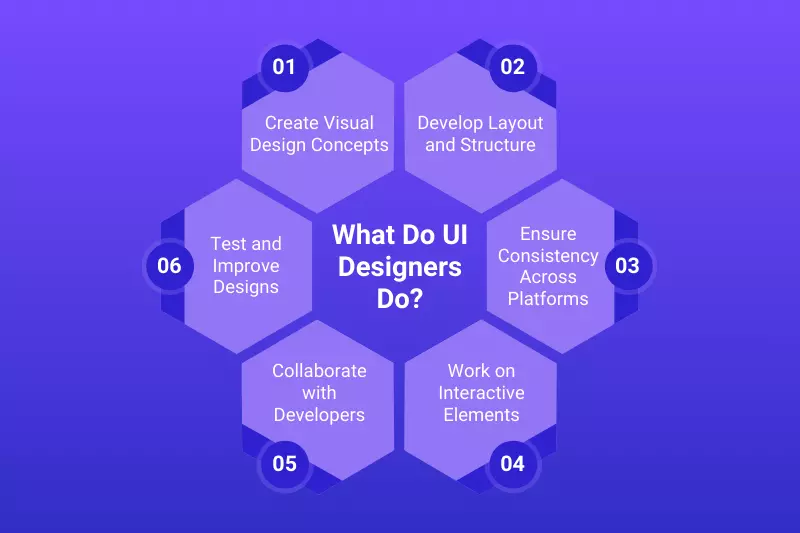
UI (User Interface) designers are responsible for creating the visual elements of digital products, ensuring that the interface is both functional and aesthetically pleasing. They focus on designing the layout, color scheme, typography, and overall visual elements of websites, apps, and other digital platforms.
UI designers work closely with UX designers, developers, and other stakeholders to create cohesive and engaging interfaces that offer an intuitive user experience. Their role is crucial in making digital products accessible, usable, and visually appealing, enhancing the user's interaction with the system.
To excel as a UI designer, one must possess a unique blend of creative, technical, and strategic skills. Unlike UX designers who focus on the user journey, UI designers are responsible for the look and feel of digital interfaces, ensuring they’re aesthetically pleasing, functional, and in line with the brand’s identity. A strong understanding of visual principles, interaction, and accessibility is crucial in UI design.
These skills help designers create digital experiences that are not only intuitive but also engaging, visually cohesive, and aligned with the user’s needs. Below are the essential skills required for UI designers to stand out in this competitive field.
Visual design is at the core of UI design, as it dictates how users will perceive and interact with the product. UI designers must understand color theory, typography, layout, and overall aesthetics to create visually appealing and harmonious interfaces. A keen aesthetic sense enables designers to create designs that resonate emotionally with users, fostering a strong connection with the brand.
By applying design principles such as balance, contrast, and visual hierarchy, UI designers can guide user attention effectively and make interactions smoother. This skill is not just about making designs look good; it’s about creating a functional beauty that enhances the user experience.
Mastery of design tools like Figma, Adobe XD, and Sketch is a must for UI designers, as these platforms allow them to build, iterate, and refine interfaces. Each tool provides specific capabilities for creating wireframes, prototypes, and final designs that bring ideas to life in a digital format.
Proficiency in design tools enables UI designers to experiment with different layouts, color schemes, and typography choices swiftly, making the design process efficient and versatile. Familiarity with these tools also makes collaboration with other teams easier, as designers can share editable files, receive feedback, and make real-time changes that improve productivity and precision in the final design.
A UI designer needs a strong understanding of branding to ensure that the product’s interface aligns with the company’s identity and values. This includes translating the brand’s colors, logo, fonts, and tone into the digital interface to create a cohesive experience that users recognize and trust.
Branding knowledge allows UI designers to create interfaces that are not only visually consistent but also reflective of the brand’s message and character. By embedding branding elements thoughtfully, UI designers ensure that the product stands out in the market, fosters user loyalty, and communicates the company’s values seamlessly across various touchpoints.
Typography is a critical component of UI design, as it affects readability, mood, and overall interface appeal. UI designers must understand font selection, pairing, sizing, and spacing to present text clearly and attractively. Choosing the right typography can guide users, establish a hierarchy, and create a visually engaging experience that complements the interface’s layout and branding.
Designers use typography to set the tone of the design whether it’s playful, professional, or elegant. By mastering typography, UI designers enhance the user’s journey, ensuring that every word is legible, accessible, and aligned with the brand’s personality and the product’s function.
Adding interaction and animation to a design creates a dynamic and engaging user experience, making the interface feel more responsive and intuitive. UI designers who understand interaction design can incorporate micro-animations, transitions, and hover effects to guide users and provide feedback on actions. These subtle animations help users understand what elements are clickable, creating an intuitive sense of flow throughout the interface.
Mastering interaction design also allows UI designers to make the product more enjoyable, enhancing the overall user experience and helping users interact seamlessly with the product. When applied thoughtfully, animation can transform a static design into an interactive experience that engages and delights users.
UI designers need to understand color theory and the psychological impact colors have on users. Colors can evoke specific emotions and perceptions, which is why choosing the right color palette is essential to align with the product’s goals and the brand’s identity. UI designers use color contrasts, harmony, and branding guidelines to create visually pleasing interfaces that guide the user’s attention.
By mastering color theory, designers can influence users’ moods and behaviors, ensuring that the interface feels cohesive and consistent with the brand’s messaging. Understanding how colors affect user perception allows designers to create more meaningful and emotionally resonant designs.
Effective layout and composition are essential in UI design for creating organized and aesthetically balanced interfaces. UI designers need to understand grid systems, spacing, alignment, and visual hierarchy to make information accessible and easy to follow. By mastering layout principles, designers can structure content in a way that directs user attention and minimizes cognitive load, making the interface easier to navigate.
Proper layout and composition ensure that each element is well-placed and that the design flows logically from one section to another. This skill helps designers create clean, uncluttered interfaces that not only look professional but also enhance usability.
In today’s digital world, UI designers must create designs that function well across various devices, including smartphones, tablets, and desktops. This requires understanding responsive and adaptive design techniques to ensure that interfaces are user-friendly on different screen sizes.
UI designers must consider breakpoints, flexible layouts, and adaptable elements to make the design scalable without sacrificing quality or usability. By mastering responsive design, UI designers create a seamless experience across devices, catering to a broad user base and ensuring that the product remains accessible and visually appealing on any platform.
A keen attention to detail is essential for UI designers to create polished, professional interfaces that elevate user experience. Every element, from padding and margins to color matching and alignment, must be meticulously checked to achieve visual harmony and precision. Attention to detail ensures that the design looks consistent, minimizing distractions and making the interface more intuitive for users.
This level of care is reflected in a high-quality product, showing that the designer has taken the time to fine-tune every aspect. Designers who prioritize detail create interfaces that not only look sophisticated but also work seamlessly, leaving a positive impression on users.
Accessibility is a key consideration in UI design, ensuring that digital products are usable for people with varying abilities. UI designers must be familiar with accessibility standards, such as appropriate color contrast, alternative text, scalable fonts, and keyboard navigation to make products inclusive. By designing with accessibility in mind, UI designers ensure that individuals with visual, auditory, or motor impairments can use their interfaces.
This commitment to inclusivity broadens the product’s reach and demonstrates ethical responsibility. A UI designer’s understanding of accessibility not only makes the product more usable but also reflects a commitment to creating a universally positive experience.
UX (User Experience) and UI (User Interface) designers play distinct yet complementary roles in the design of digital products. While both focus on improving user interaction, their responsibilities differ in terms of scope and approach. UX designers primarily concentrate on the overall experience and functionality, ensuring that users can navigate and interact with the product effectively.
UI designers, on the other hand, focus on the visual aspects of the interface, ensuring the product looks appealing and is easy to use. Both roles are essential for creating a successful digital product, but they require different skills and expertise. Below is a comparison of the two:
The salary of a UI/UX designer can vary based on factors such as experience, location, industry, and the specific skills they bring to the table. On average, a UI/UX designer in the United States earns around $80,000 to $100,000 per year. Entry-level positions typically start at about $60,000 annually, while those with more experience can earn upwards of $120,000 or more.
For senior-level roles or those in specialized areas like UX research or UI design for complex systems, salaries can exceed $130,000 annually. The demand for skilled designers has risen significantly with the increasing emphasis on user-centric design in technology products, creating lucrative opportunities for professionals in the field. In other parts of the world, salaries can differ significantly.
For instance, in the UK, a UI/UX designer earns, on average, between £35,000 and £55,000 annually, with the potential to reach £70,000 for experienced roles. In India, salaries tend to be lower, with the average annual pay ranging from ₹500,000 to ₹1,200,000 depending on experience. As the field continues to grow globally, UI/UX designers are seeing better compensation as companies recognize the value of providing seamless and enjoyable user experiences.
Entry-level UI design positions are great opportunities for those looking to start their careers in user interface design. These roles often require a foundational understanding of design principles, a working knowledge of design tools like Figma, Sketch, and Adobe XD, and an ability to work collaboratively in a team.
Entry-level UI designers are typically responsible for creating wireframes, prototypes, and visual elements that align with the overall design strategy. While these roles may not come with high salaries, they provide an excellent learning environment and offer opportunities for growth as professionals gain experience and expertise. Below is an overview of 12 entry-level UI job roles and their average salaries:
The salary of a UI designer varies significantly depending on factors such as experience, location, industry, and the complexity of the projects they work on. UI designers, especially those with specialized skills or experience in high-demand industries like tech and finance, tend to earn higher salaries.
Entry-level designers typically earn a modest salary, while those with more experience or in senior roles can earn considerably more. Salaries can also vary by region, with designers in large cities or tech hubs earning more than those in smaller towns or areas with lower living costs. Below is an overview of the average salary for UI designers at various experience levels:

The demand for UI/UX designers has been steadily increasing as businesses across industries recognize the value of creating intuitive, user-friendly products. As technology continues to evolve and digital experiences become central to consumer engagement, companies are investing more in design talent.
With the rise of mobile apps, e-commerce, and software development, the need for skilled UI/UX designers is more prominent than ever. Organizations are seeking professionals who can enhance the user experience, making products more accessible, engaging, and functional. The demand for UI/UX designers is expected to grow even further as digital innovation accelerates.
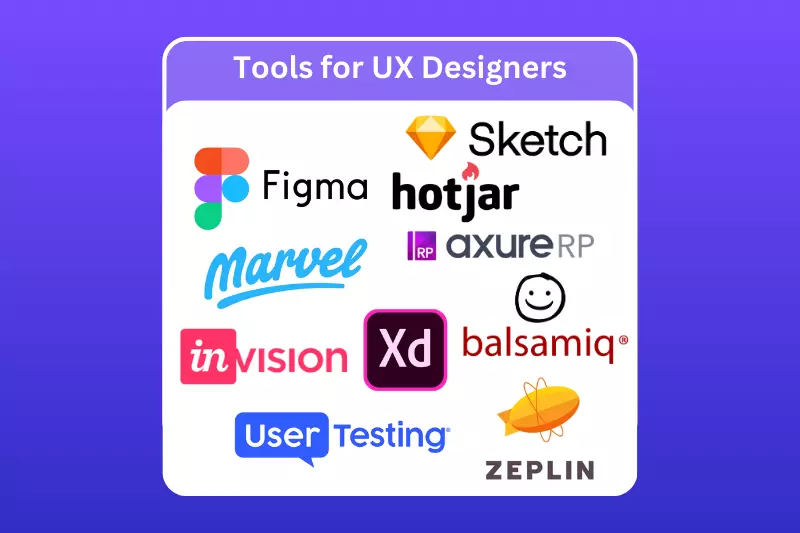
UX design tools are essential for creating user-centered designs, as they help designers visualize and prototype the user journey, making the design process more efficient and collaborative. These tools are used for various stages of UX design, from research and ideation to prototyping and testing.
They enable UX designers to create wireframes, interactive prototypes, and user flows, ensuring the final product is intuitive, functional, and aligned with user needs. The right tools help streamline the process, enhance creativity, and ensure a smooth user experience. Below are some of the most popular tools used by UX designers:
UI/UX design has become one of the most sought-after career paths in the tech industry. As companies continue to prioritize user experience, there is an increasing demand for skilled professionals who can create intuitive, aesthetically pleasing interfaces that enhance user satisfaction. With digital transformation taking center stage across industries, the need for UI/UX designers to create seamless, user-friendly products is critical.
This career offers a blend of creativity and problem-solving, making it appealing to individuals with a passion for both design and technology. The profession offers strong job stability and career growth, with opportunities in various sectors such as tech, healthcare, finance, and e-commerce. Moreover, UI/UX design provides a competitive salary and flexibility.
The demand for these professionals is only expected to grow as businesses recognize the importance of user-centric design in driving engagement and business success. With many opportunities to work remotely or as a freelancer, UI/UX designers can enjoy a good work-life balance. Additionally, the field encourages continuous learning as designers keep up with new tools, trends, and technologies. This makes UI/UX design not only a financially rewarding career but also a highly dynamic and evolving field.
Becoming a UI/UX designer involves developing creativity, technical skills, and a deep understanding of user needs. Building a strong foundation in design principles, prototyping, and user research is essential, which can be achieved through formal education or self-learning. Gaining hands-on experience through projects and internships is key to building a solid portfolio.
Networking with professionals and staying updated on design trends will further enhance your career prospects. With dedication, persistence, and continuous learning, you can successfully pursue a rewarding career in UI/UX design, shaping impactful user experiences across industries.
Copy and paste below code to page Head section
UI design focuses on the visual aspects of a product, such as layout, colors, and typography. UX design, on the other hand, is about optimizing the overall experience for the user, ensuring ease of use, and improving the user’s interaction with the product. Both are essential for creating effective digital products.
While a formal degree in design or related fields can be beneficial, it is not a strict requirement. Many successful UI/UX designers have gained skills through online courses, boot camps, or self-study. Building a strong portfolio with practical experience is key to securing a role in the field.
Key skills for UI/UX designers include proficiency in design tools (e.g., Sketch, Figma), wireframing, prototyping, user research, and understanding design principles. Additionally, communication skills, creativity, problem-solving, and attention to detail are essential to creating intuitive, visually appealing designs that meet user needs.
UI/UX designers commonly use tools like Figma, Sketch, Adobe XD, InVision, and Balsamiq for wireframing, prototyping, and designing interfaces. For user research, tools such as UserTesting and Hotjar help gather feedback, while collaboration tools like Miro facilitate brainstorming and team communication during the design process.
Salaries for UI/UX designers vary depending on location, experience, and skill level. On average, in the U.S., entry-level designers earn around $55,000 per year, while mid-level designers earn between $75,000 and $95,000. Senior UI/UX designers can make $110,000 or more, depending on their expertise and role within the company.
Becoming a UI/UX designer typically takes anywhere from 6 months to 2 years, depending on your learning path. If you're studying full-time, you might finish a boot camp in a few months, while a formal degree may take longer. Continuous learning and experience are important even after landing your first job.


